How Do I Give Joy More Context About My Company?
Last updated: April 15, 2026
You can now add company information, FAQs, and supporting documents directly in Classet. Joy draws from them when candidates ask questions during interviews, whether it's about benefits, pay ranges, shift structures, or anything else you want her to speak to accurately.
It's all in one place under your settings, and applies to every interview Joy runs.
Where to Find It
In the script designer, click the Knowledge Base tab at the top. From there you can add entries at three levels:
Company level applies to all your job postings across the board.
Job level links information to a specific job, so every script using that job inherits it.
Script level links information to a specific interview script only.
Joy automatically pulls from all applicable levels during an interview.
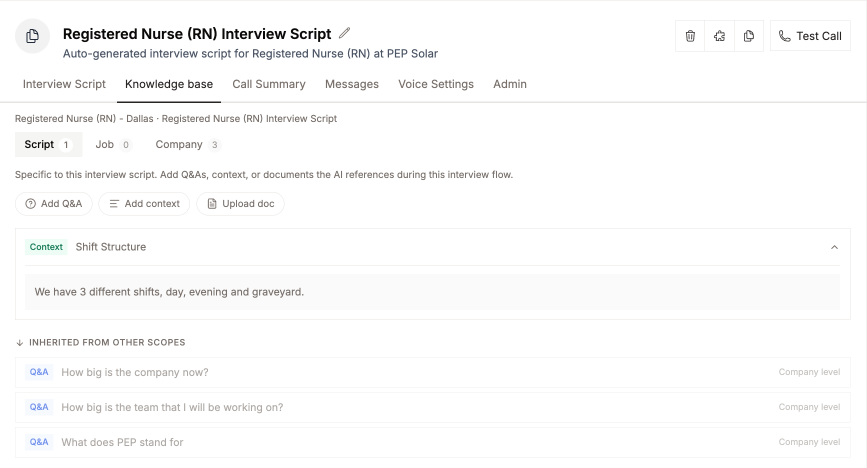
What You Can Add
Q&A pairs are best for common candidate questions. Add a question and the answer you want Joy to give.
Context works well for general information that doesn't fit a question format, like a few paragraphs about your company culture, internal policies, or role expectations.
Documents let you upload files you already have, such as an employee handbook or candidate guidelines. Joy will reference these during calls.
Tips for Getting Started
If you already have FAQs set up, they've been migrated automatically. Check your Knowledge Base to confirm everything looks right.
Start with company-level entries for information that applies everywhere, like benefits, company size, or your mission. Then add job-level or script-level entries for anything role-specific.
Keep entries concise. Joy works best with clear, direct information she can relay naturally in conversation.
Have more questions? Contact success@classet.ai